Skip to content
Browse Operations applications

Operations

TaskStrike icon

TaskStrike

Task management software and standard work software

Expectations become visible action.

TaskStrike turns standards, routines, approvals, and scan checkpoints into assigned action. It helps organizations convert procedures and tribal knowledge into visible, repeatable execution across teams, sites, and shifts.

TaskStrike is Nest2App's task management software and standard work software for teams that need expectations become visible action with ownership, proof, and connected follow-through.

TaskStrike configurable operational task engine

What problem it solves

Expectations become visible action.

Standards and procedures are often documented but not executable, which leaves teams relying on memory, handoffs, and local workarounds.

TaskStrike turns routines into visible execution and keeps them connected to approvals, scans, escalations, and the rest of the ecosystem.

Primary problems solved

Track Work OrdersStrengthen ComplianceImprove Reporting
  • Create workflows from modular step types
  • Description steps for context and operational notes
  • Action steps for manual work like inspect, weld, clean, or stage
  • Linked Task steps to pull in saved routines and standardize execution
  • Enforce checkpoints with scans

Comparison

Why teams choose TaskStrike for task management software and standard work software

The difference is not just the interface. It is whether the workflow stays connected to ownership, proof, visibility, and improvement after the first action happens.

Workflow scope

Standalone task management software and standard work software usually handles one workflow step, one queue, or one form.

TaskStrike keeps expectations become visible action connected to the wider Nest2App execution system instead of stopping at the first action.

Visibility by role

Updates often stay local to one team, which makes ownership and leadership visibility harder to trust.

Nest2App gives leaders, managers, supervisors, and frontline users role-aware visibility into the same record and next action.

Proof and improvement

Teams often rebuild context later from messages, spreadsheets, and memory when something needs review.

TaskStrike preserves proof, history, and trend visibility so the workflow can improve instead of repeating the same miss.

Screenshots

See TaskStrike in the workflow

These views show how the application appears in real operating use, not just in a feature list.

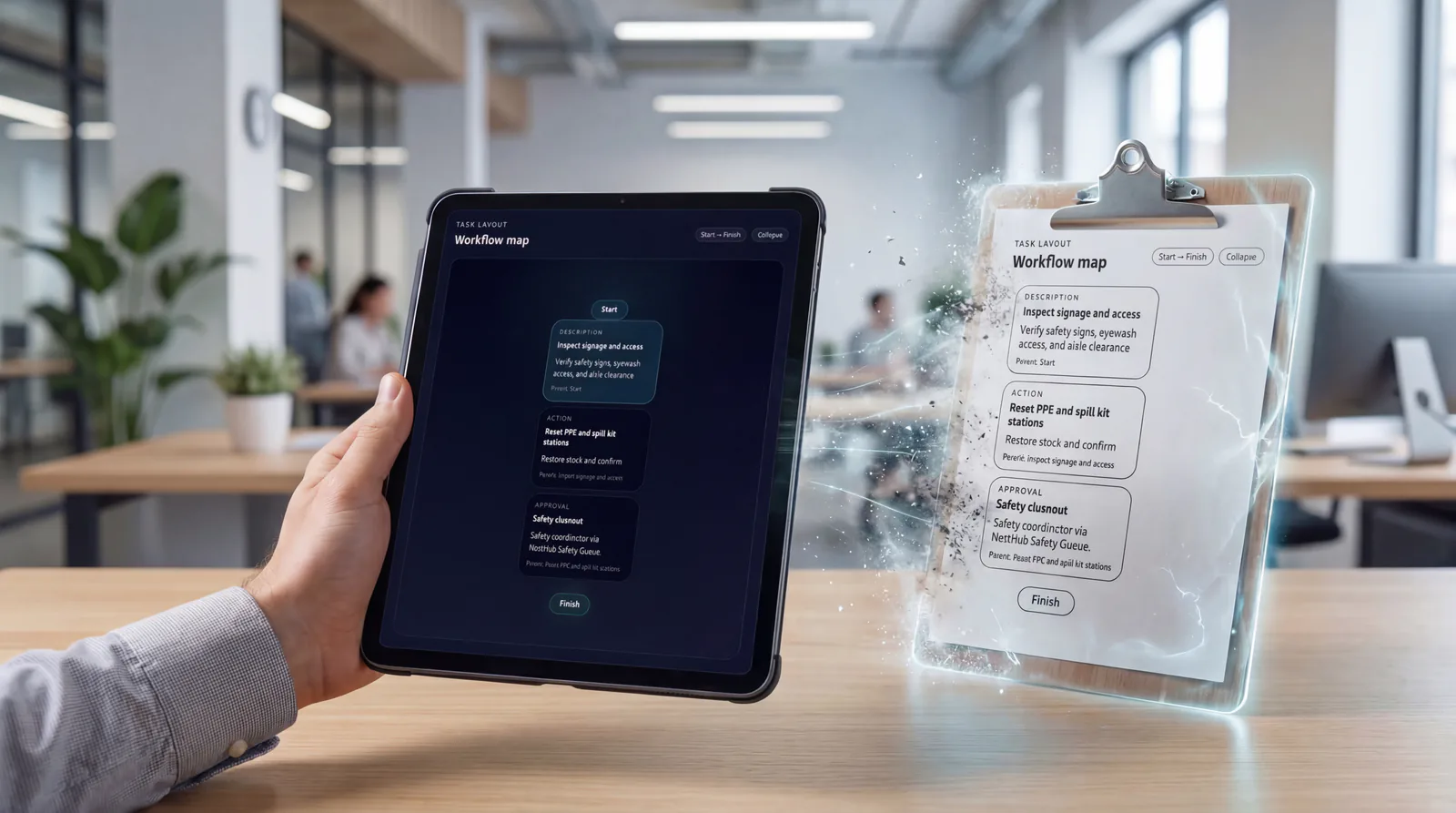
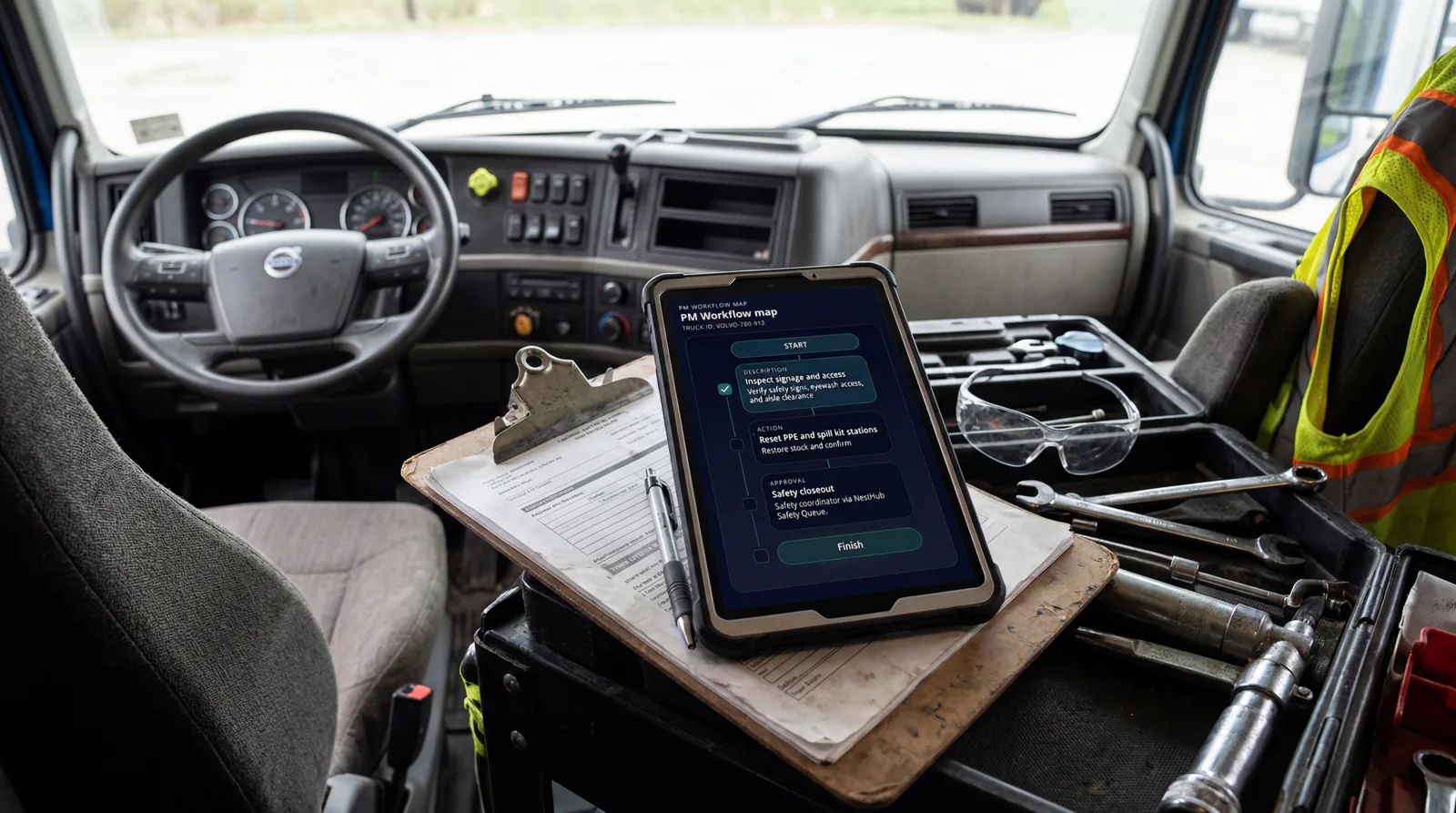
TaskStrike workflow builder with approvals scans and linked routines

Create workflows from modular step types

TaskStrike lets teams build routines from reusable step types instead of forcing every process into a generic checklist. This makes it possible to model real operational work with the right balance of flexibility and control.

TaskStrike configurable operational task engine

TaskStrike overview

TaskStrike turns standards, routines, approvals, and scan checkpoints into assigned action. It helps organizations convert procedures and tribal knowledge into visible, repeatable execution across teams, sites, and shifts.

Execution loop

How TaskStrike supports the execution loop

Only the stages that apply are highlighted here, but each one stays connected to the broader Nest2App execution system.

Step 1

Assign

Make ownership visible so the next action is clear and accountable.

Step 2

Execute

Complete the work through guided workflows, mobile actions, and role-aware tools.

Step 3

Verify

Confirm completion, compliance, and quality with proof instead of assumptions.

Step 4

Improve

Use trends, reporting, and lessons learned to make tomorrow’s execution stronger.

Who uses it

Every role sees this application differently.

The process stays consistent. The perspective changes by role.

CEO / Owner

Executives see whether critical routines are actually happening and where process discipline is slipping.

Manager

Managers see routine completion, pending approvals, delayed flow steps, and where escalation is needed.

Supervisor

Supervisors coordinate daily execution with clearer visibility into who owns the next action and what still needs proof.

Employee / User

Frontline users get step-by-step workflows, scan validation, and the exact next action without guessing.

Key features

Turn standards into executable routines

Create workflows from modular step types

TaskStrike lets teams build routines from reusable step types instead of forcing every process into a generic checklist. This makes it possible to model real operational work with the right balance of flexibility and control.

  • Description steps for context and operational notes
  • Action steps for manual work like inspect, weld, clean, or stage
  • Linked Task steps to pull in saved routines and standardize execution
TaskStrike workflow builder with approvals scans and linked routines

Enforce checkpoints with scans

Require workers to verify the correct asset or location before continuing. Scan-based checkpoints add real-world confirmation to field execution and help prevent skipped steps, wrong-location work, or weak process verification.

  • Scan Tag steps for asset or location validation
  • Supports controlled progression through the routine
  • Strengthens traceability in physical operations

Pause for approvals when the process requires it

Some work cannot continue until the right person signs off. Approval steps let TaskStrike stop the flow, notify an approver or inspector, and resume only after the required decision has been made.

  • Approval holds within the routine
  • Supervisor or inspector sign-off support
  • Better control for QA, safety, and operational oversight

Create work orders the moment a routine finds an issue

When a routine uncovers a problem, teams should not have to leave the flow and start over in another system. TaskStrike can generate a WorkOrderPro request directly from the workflow so issues move into tracked execution without being lost.

  • Create Work Order steps built into the routine
  • Connect issue discovery to corrective execution
  • Improves follow-through across inspections and field workflows

Repeat critical blocks with routine loops

For processes that require repeated checks, interval verification, or recurring checkpoint enforcement, TaskStrike can loop a block of steps and require completion at the right points throughout the routine.

  • Routine Loop steps for repeated process blocks
  • Useful for rounds, recurring checks, and controlled procedures
  • Improves consistency in longer operational routines

Key features

Built for execution, not generic task lists

Turn SOPs into executable routines

TaskStrike helps teams convert static procedures and informal tribal knowledge into something executable, repeatable, and visible. Instead of storing instructions in a binder or PDF and hoping the process is followed correctly, organizations can define the sequence of work directly in the system.

  • Better consistency across people and shifts
  • Stronger process standardization across sites
  • Less dependence on memory or verbal handoff

Reuse proven routines across operations

Linked Task steps let teams bring approved task lists into larger workflows so organizations can standardize best practices without rebuilding the same process over and over again.

  • Reusable task libraries
  • Faster deployment across teams and sites
  • Easier scaling of proven process design

Make execution visible and reviewable

TaskStrike gives operations leaders visibility into how work is being performed, where routines pause, which approvals are pending, and where issues are being found. This improves oversight without forcing managers to chase updates manually.

  • Better visibility into workflow progression
  • Reviewable checkpoints and approvals
  • Stronger operational accountability

Use cases

Where TaskStrike strengthens execution

Plant and site routines

Standardize startup, shutdown, rounds, inspections, and recurring operational procedures with checkpoints and repeatable flow logic.

Approval-driven processes

Pause work for supervisor, QA, safety, or inspector review before the routine can continue.

Inspection and field follow-up

Use scan checkpoints, manual actions, and issue-triggered work order creation to connect discovery directly to execution.

Sanitation and quality workflows

Build structured cleaning, verification, and controlled process routines that require repeat checks and sign-off where needed.

Cross-team operational handoffs

Coordinate structured task progression across departments without relying on email chains or informal memory.

Standardized procedures across sites

Deploy reusable routines that keep execution consistent even when teams, shifts, or locations change.

Example workflows

How teams use TaskStrike in practice

Common use cases include Plant and site routines, Approval-driven processes, Inspection and field follow-up, Sanitation and quality workflows, Cross-team operational handoffs, Standardized procedures across sites.

Startup and shutdown standard work

A team follows a guided routine with approvals, scans, and loops so the standard is executed the same way every time.

Sanitation or quality routine

A repeatable process runs on the right cadence, pauses for approval, and escalates if the workflow uncovers an issue.

Where it fits

How TaskStrike fits across category, industry, and solution context

TaskStrike can stand on its own, but these related pages show where the workflow fits inside broader task management software and standard work software and execution conversations.

Category

Operations applications

Teams searching for workflow execution software, inspection management tools, work order systems, operational portals, or digital logbook software need one process that keeps the day moving. Nest2App connects those workflows instead of scattering them across separate tools.

Industry examples

Warehousing

SupplyMate, AssetNest, TaskStrike, TourMate, SnapSafe, and Overwatch help connect warehouse execution.

Construction

SnapSafe, TourMate, CrocEDU, SafeExit, CrocLock, and NestHub support core construction workflows.

Healthcare Operations

TaskStrike, WorkOrderPro, TourMate, CrocEDU, SupplyMate, SnapSafe, and Overwatch help connect healthcare operations workflows.

Related solution pages

Safety Compliance Software

Buyers searching for safety compliance software usually need more than records. They need one operating flow that helps teams capture risk, assign follow-through, verify the standard, and show leadership what is still open.

EHS Software

EHS buyers often compare large suites and point tools. Nest2App fits organizations that want environmental, health, and safety workflows tied directly to day-to-day execution, ownership, and proof.

OSHA Compliance Software

Organizations evaluating OSHA compliance software usually need a practical way to connect training requirements, site verification, hazard communication, corrective action, and review-ready records.

Incident Reporting Software

Incident reporting buyers usually need more than a form. They need the report to trigger triage, ownership, action, and leadership visibility before the issue disappears into email or memory.

Hazard Reporting Software

Hazard reporting software should make frontline reporting easy and follow-through unavoidable. Nest2App keeps hazards visible from first report to final closeout.

Safety Inspection Software

Safety inspection software should do more than digitize a checklist. It should keep the route consistent, connect findings to action, and show whether the standard is actually holding.

Audit Management Software

Audit management software should make it easier to prove what happened, who owned it, and whether the standard held. Nest2App helps teams connect audits back to the real work behind them.

Safety Training Software

Safety training software should do more than record completions. Nest2App helps teams connect required training to frontline behavior, inspection proof, corrective action, and reporting.

Work Order Management Software

Work order management software should do more than accept requests. It should route work clearly, show what is delayed, and keep proof of completion tied to the record.

Asset Tracking Software

Asset tracking software should help teams do more than find an item in a list. Nest2App turns asset identity into live workflow context for inspections, work, and reporting.

Inventory Management Software

Inventory management software should help teams control stock and replenish before shortages interrupt execution. Nest2App keeps inventory tied to the workflow around it.

Operations Management Software

Operations management software should help teams see what needs to happen today, who owns it, and what is slipping. Nest2App connects that operating picture across departments and roles.

Task Management Software

Task management software should make action clear, visible, and accountable. Nest2App helps organizations turn routines, follow-up work, and approvals into owned execution.

Operations Reporting Software

Operations reporting software should tell leaders what is really happening, not just what was entered into a dashboard. Nest2App ties reporting back to the actual workflow behind the numbers.

Contractor Management Software

Contractor management software should make it clear who is approved, what requirements are complete, and how contractor activity connects to site control. Nest2App helps keep that workflow visible.


Related comparisons

Nest2App vs SafetyCulture

Organizations often evaluate SafetyCulture when the initial need is inspections, checklists, or frontline form capture. Nest2App is the better fit when that need must stay connected to training, incidents, work execution, and leadership visibility.

Nest2App vs Cority

Organizations often evaluate Cority when the starting point is EHS software and compliance management. Nest2App is the better fit when those needs must stay connected to broader operational execution.

Nest2App vs MaintainX

Organizations often evaluate MaintainX when the initial need is maintenance, work orders, or operational checklists. Nest2App is the better fit when those needs must stay connected to broader safety, asset, inventory, and reporting workflows.

Nest2App vs VelocityEHS

Organizations often evaluate VelocityEHS when the buying motion starts around EHS workflows and compliance reporting. Nest2App is the better fit when those workflows need to stay connected to broader operational execution.

Connected apps

Integrated with the ecosystem

This application is one mechanism inside the larger execution system. These are some of the tools it works alongside.

TaskStrike gave us a way to turn procedures into something people could actually execute step by step. The approvals, scans, and work order trigger made the process far more reliable than a checklist in a binder.
Operations Excellence Lead, Multi-site enterprise operations
Operations Excellence Lead logo

Reporting / visibility

Visibility that supports better decisions

TaskStrike shows routine completion, delayed steps, pending approvals, repeat choke points, and execution reliability across teams and sites.

FAQ

FAQ about TaskStrike

What makes TaskStrike different from a normal task manager?

TaskStrike is a configurable operational task engine, not just a basic task list. It supports structured step types such as instructions, actions, scans, approvals, linked routines, routine loops, and issue-triggered work order creation.

What step types are available in TaskStrike?

TaskStrike supports Description, Action, Scan Tag, Approval, Create Work Order, Linked Task, and Routine Loop steps. These can be combined to build repeatable operational workflows.

Can TaskStrike require approvals before work continues?

Yes. Approval steps can pause a routine and notify the required approver or inspector before the workflow moves forward.

Can TaskStrike verify that work is happening in the right place?

Yes. Scan Tag steps can require an asset or location scan before the user can continue, helping validate physical execution in the field.

Can TaskStrike create work orders automatically?

Yes. A workflow can include a Create Work Order step that sends identified issues into WorkOrderPro for tracked execution and closure.

Can teams reuse saved routines instead of rebuilding them?

Yes. Linked Task steps let organizations pull saved task lists into larger workflows so proven routines can be reused across teams and sites.

What are routine loops used for?

Routine Loop steps are used to repeat a block of work and require checkpoints at intervals. They are useful for rounds, repeated checks, and longer procedures that need controlled repetition.

How is TaskStrike different from WorkOrderPro?

WorkOrderPro is used to capture requests, assign ownership, and track execution to completion. TaskStrike is used to design and run the operational routine itself using structured workflow steps, approvals, scans, loops, and issue-triggered actions.

Next step

Turn expectations into assigned action

Use TaskStrike to build structured routines with approvals, scans, linked workflows, repeat loops, and owned next actions.