Skip to content
Browse Safety applications

Operations

TourMate icon

TourMate

Inspections become verified execution.

TourMate turns recurring inspections, rounds, and checks into verified execution with proof. Teams define the standard once, run it consistently, record what they see, and turn misses into owned follow-up.

Teams comparing inspection software, inspection management software, and safety inspection app use TourMate when they need inspections become verified execution inside a connected execution system.

TourMate guided inspections

What problem it solves

Inspections become verified execution.

Inspections often vary by person, by shift, or by site, which makes standards difficult to verify and harder to improve.

TourMate gives organizations one repeatable inspection process that ties findings, proof, and follow-up back into the same execution system.

Primary problems solved

Manage InspectionsStrengthen ComplianceImprove Reporting
  • Defined tours & guided inspections
  • Run consistent step-by-step inspections
  • Log new findings during each tour
  • Verify fixes and flag unresolved issues
  • Scheduling & accountability

Execution loop

How TourMate supports the execution loop

Only the stages that apply are highlighted here, but each one stays connected to the broader Nest2App execution system.

Step 1

Identify

Recognize a need, risk, inspection point, asset issue, task, incident, training gap, or compliance requirement.

Step 2

Report

Capture the information clearly at the source so it can move through the system.

Step 3

Assign

Make ownership visible so the next action is clear and accountable.

Step 4

Verify

Confirm completion, compliance, and quality with proof instead of assumptions.

Step 5

Improve

Use trends, reporting, and lessons learned to make tomorrow’s execution stronger.

Who uses it

Every role sees this application differently.

The process stays consistent. The perspective changes by role.

CEO / Owner

Executives see inspection completion, repeat misses, and site-by-site performance trends.

Manager

Managers see which checks are overdue, which findings repeat, and where corrective action is lagging.

Supervisor

Supervisors run inspections, verify fixes, and keep standards holding across the day.

Employee / User

Frontline users follow the right inspection flow, capture what they see, and verify issues at the source.

Key features

Verify the standard with less friction

Defined tours & guided inspections

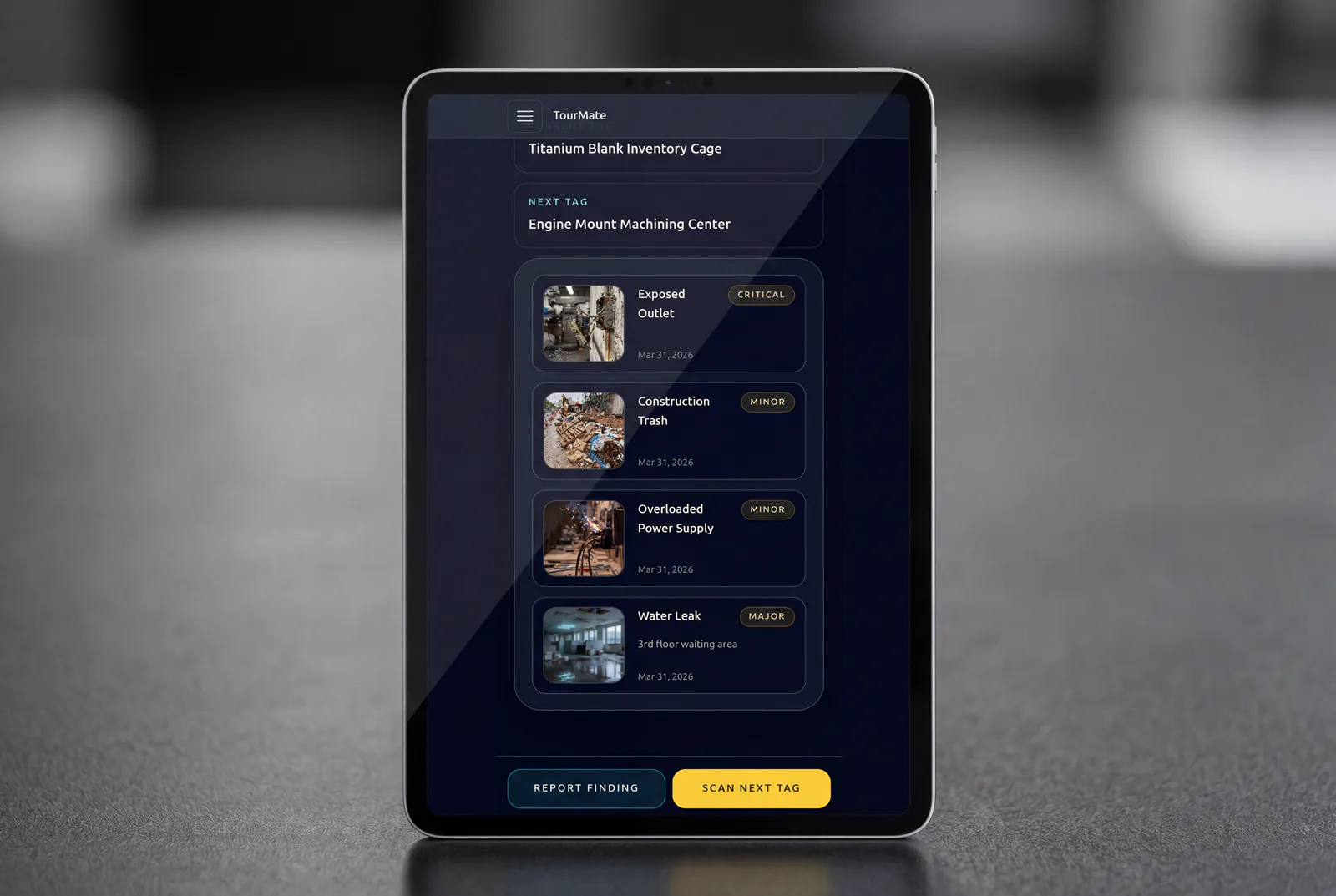
Define inspections once and run them consistently. Teams follow clear steps, log new findings, and verify if previous issues have been resolved.

  • Run consistent step-by-step inspections
  • Log new findings during each tour
  • Verify fixes and flag unresolved issues
TourMate guided checklist screen

Scheduling & accountability

Keep inspections on track with scheduled tours and clear accountability. Teams know what’s due, what’s overdue, and what needs attention.

  • Run inspections on a consistent schedule
  • Notify teams before tours are due
  • Flag overdue inspections immediately
TourMate scheduling and reminders screen

Risk & attention focus

Focus attention where it matters most. High-risk findings, unresolved issues, and overdue items are surfaced immediately so nothing critical is missed.

  • Highlight the highest-risk inspection items
  • Prioritize work with clear risk levels
  • Flag overdue and high-risk gaps instantly
TourMate risk-ranked inspections screen

Findings to work orders

Turn inspection findings into action immediately. Create work orders with full context so issues are owned, tracked, and resolved.

  • Turn findings into work orders instantly
  • Assign owners with clear accountability
  • Track status through to completion

History & scoring over time

Every tour builds a record. Track new findings, completed fixes, and unresolved issues over time to understand performance and improve operations.

  • Track findings across every inspection run
  • Measure completed vs unresolved issues
  • Build a tour score over time

Use cases

Where TourMate strengthens execution

Daily safety walks

Keep routine checks consistent and recorded.

Line changeovers

Record steps and sign-offs during changeovers.

Equipment rounds

Scan assets and log readings quickly.

Example workflows

How teams use TourMate in practice

Common use cases include Daily safety walks, Line changeovers, Equipment rounds.

Daily operational rounds

Supervisors run a recurring check, log new findings, confirm prior fixes, and trigger follow-up work when something slips.

QR-based equipment inspection

A user scans the right asset, completes the correct inspection path, and records proof tied to that equipment.

Connected apps

Integrated with the ecosystem

This application is one mechanism inside the larger execution system. These are some of the tools it works alongside.

Scanning the asset pulls the right context—recording and follow-ups are much quicker.
Maintenance Lead, Industrial operations
logo

Reporting / visibility

Visibility that supports better decisions

TourMate supports completion trends, open findings, repeat issues, route-level scoring, and inspection proof for leadership and audits.

FAQ

FAQ

Can inspectors see whether previous findings were fixed?

Yes. Tours can show existing findings so teams can verify what was resolved and flag anything still open.

Can findings become work orders?

Yes. New findings can be turned into work orders right away with context from the inspection.

Next step

Make inspections part of the execution loop

Define tours, verify the standard, and turn findings into visible action before the same issues repeat.